Is Surfshark Alert Worth It? Tested vs Have I Been Pwned
Have I Been Pwned found one breach for my email address. Surfshark Alert found three.
Same inbox, checked the same week. The free tool everyone recommends missed two exposures that the paid one caught, including a 2024 leak I had no idea about. That result surprised me enough to write this up properly, because it cuts right into the question you probably typed into Google: there are free breach checkers, so is paying for one ever worth it?
The honest answer has more nuance than either “yes, pay up” or “free is always enough,” so here’s the short version first, and the full data below.
Quick verdict: Don’t pay for breach monitoring alone, and in Surfshark’s case you actually can’t, since Alert isn’t sold separately. Use the free checkers first; everyone should. But in my hands-on test, Alert found real breaches the free tools didn’t show me, told me what to do about each one, and kept watching afterwards. The part I didn’t expect was seeing the actual leaked data values for my own account rather than just the categories of data involved, which meant I knew exactly which password to change instead of guessing. If you’re buying Surfshark One for the VPN and antivirus anyway, Alert turned out to be the feature that impressed me most, not bundle padding.
Disclosure: the Surfshark links in this article are affiliate links, so I may earn a commission if you buy through one, at no extra cost to you. It changes nothing about what the testing found, and the free tools I recommend first are free.
I ran both tools on camera in this video, so you can watch the results come in rather than take my word for the screenshots below.
Surfshark Alert vs Have I Been Pwned: same email, different results
I ran my main email address through Have I Been Pwned, the free breach database run by security researcher Troy Hunt, and the tool virtually every security guide (including this one) tells you to start with. It came back with one hit:
- GateHub (2019): a cryptocurrency wallet service. 1.4 million accounts posted to a hacking forum. Exposed data: email addresses, mnemonic phrases, encrypted master keys, encrypted recovery keys, and passwords stored as bcrypt hashes.
That’s a genuinely nasty breach (mnemonic phrases are the keys to crypto wallets), and knowing about it matters. One point to the free tool.
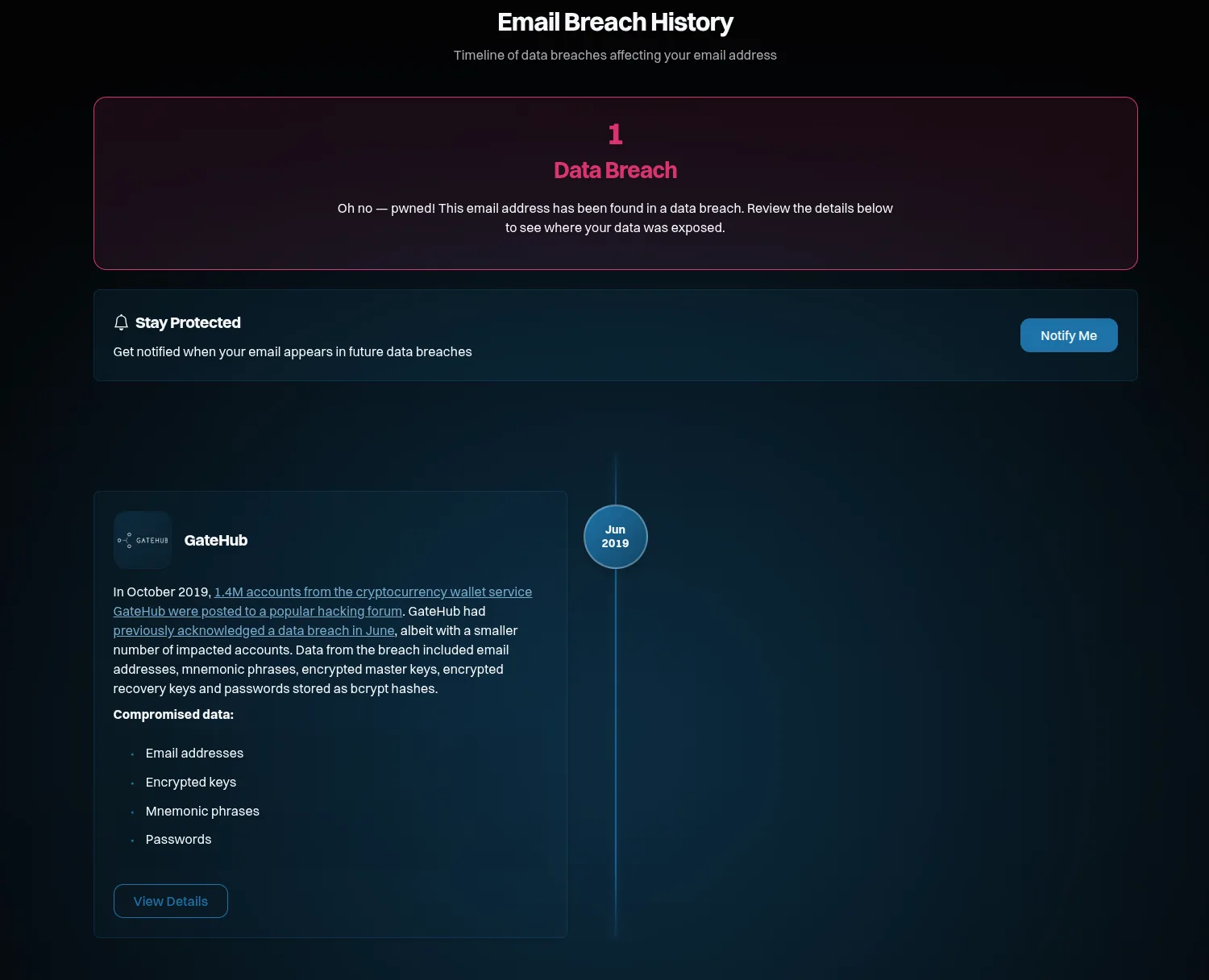
Have I Been Pwned’s result for my email: one breach, GateHub. Note the free “Notify Me” button. Turn that on regardless of what else you do.
Then I checked the same address with Surfshark Alert, which I was testing as part of my full hands-on Surfshark review. Within minutes it listed three breaches:
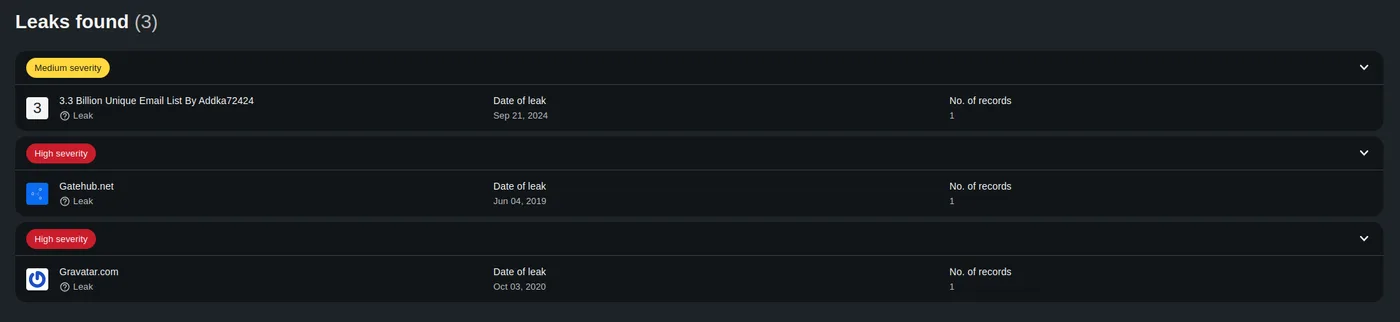
Surfshark Alert’s findings for the same email address: three breaches, each with a severity rating.
| Breach | Have I Been Pwned | Surfshark Alert |
|---|---|---|
| GateHub (Jun 2019): crypto wallet service; emails, mnemonic phrases, encrypted keys, hashed passwords | Found | Found (rated High severity) |
| Gravatar (Oct 2020): profile data scraped from the avatar service | Not shown for my email | Found (rated High severity) |
| “3.3 Billion Unique Email List” (Sep 2024): a mass-compiled email leak | Not shown for my email | Found (rated Medium severity) |
Two things are worth being precise about here, because I’m not interested in dunking on a free tool that does enormous good:
First, this doesn’t mean Have I Been Pwned is bad. Its database is huge, over 17 billion breached accounts from more than a thousand sites, and it actually does index the Gravatar scrape. For whatever reason, my specific address wasn’t matched in its copy of that dataset, while Alert’s source had me. Breach data is messy: different services ingest different corpuses, deduplicate differently, and match differently. The practical lesson isn’t “free bad, paid good.” It’s that no single checker sees everything, and a clean result from one tool is weaker evidence than it feels like.
Second, the extra findings were real, not padding. Gravatar and the 2024 email list are documented, verifiable incidents. Alert wasn’t inventing threats to scare me into renewing, a pattern I actively watch for in this industry.
By the way, if you’re looking for a Have I Been Pwned alternative, or just a second opinion, Surfshark also runs a free one-time data leak checker, no subscription needed (Surfshark states emails entered there aren’t used for marketing). Between that and Have I Been Pwned, you can get a two-source picture of your exposure for exactly $0, and you should do that before reading any further.
What Have I Been Pwned gives you for free
Credit where it’s due, because the free baseline here is genuinely excellent:
- Breach lookup for any email address, against 17+ billion breached accounts.
- Notify Me: a free alert when your address shows up in a future breach. Most people don’t know this exists; turn it on.
- Pwned Passwords: checks whether a password itself has appeared in leaks (your password never leaves your device in readable form; password managers use this same database).
If your entire goal is “tell me if my email was leaked, and tell me if it happens again,” Have I Been Pwned covers it for free, and no honest reviewer will tell you otherwise.
What Surfshark Alert actually adds
So what are you paying for? In my hands-on testing, the real differences were these:
-
It found more, for my address. Three breaches versus one, as above. Your results will differ, since breach matching is per-address, but a second data source catches things a single one misses, in both directions.
-
Severity ratings and concrete next steps. Each finding came with a rating and specific guidance on what to do about it. Have I Been Pwned tells you what leaked and leaves the judgment to you; Alert additionally triages how bad it is and what to do now. If you already know how to respond to a mnemonic-phrase leak, you don’t need this. If that sentence scared you, this hand-holding has real value.
A note on those ratings, because Surfshark doesn’t publish the exact criteria anywhere I could find. Its docs only say breaches are classed High, Medium, or Low and that you should address High ones first. From my own results the logic is visible, though: the two breaches that exposed credential material, GateHub (passwords, wallet keys) and Gravatar (scraped profile data), were rated High, while the 2024 compilation that contained only email addresses got Medium. In plain terms: High means “something that can be used to get into your accounts leaked, so act now”; Medium means “your address is circulating and you should expect spam and phishing, but no keys to anything leaked.” That’s my observed pattern, not an official definition, but it matches how any security professional would triage the same list. It’s also a fair summary of the whole free-vs-paid difference: with the free tool, that triage paragraph is the part you have to do yourself by reading each breach’s “compromised data” list.
-
It shows you the leaked data itself, not just categories. This is the difference I’d call most underrated. For GateHub, Have I Been Pwned tells you the breach included “email addresses, encrypted keys, mnemonic phrases, passwords,” which are categories, listed for everyone affected, leaving it up to you to guess what that means for your account. In Alert, I could see the actual data values exposed for my specific account. That changes what you can do with the information: instead of “some password of mine leaked, hopefully an old one,” it’s “that password leaked, so I know exactly where else I’ve used it and what to change.” It also instantly defuses the extortion-scam genre I cover below: when a threatening email quotes “your password,” you can check whether it’s just the long-leaked one from a 2019 dump. To be fair, HIBP’s restraint here is deliberate. It’s a free public service and won’t display anyone’s leaked values, which is the responsible default for a tool anyone can point at any email address. Alert can show them because you’ve verified you own the monitored addresses. But as a paying user dealing with your own breach, seeing the real values is the version you want.
-
Continuous monitoring of multiple identifiers, not just one email. Alert watches several email addresses, and Surfshark says it also monitors credit card numbers and national IDs from 90+ countries. I tested the email monitoring firsthand; I haven’t independently verified the card and ID monitoring, so treat those as vendor claims I’ll test when I can.
-
Breach flags in your search results. The browser extension marks Google results with a small warning if that site recently had a breach. A quiet “maybe don’t make an account here” nudge that I found genuinely useful in daily browsing.
And what it doesn’t do, so you’re not surprised: Alert is breach monitoring, not a full identity-theft service. There’s no credit-report monitoring or credit score tracking, no SMS alerts, and no dedicated recovery caseworker. If you want those, you’re shopping for a dedicated identity-protection service (a different product category with a very different price). Also, to repeat the structural catch: you can’t buy Alert by itself. Surfshark’s own FAQ is plain about it: Alert only ships inside the Surfshark One and One+ bundles.
”My email was in a breach from 2019. What do I actually do now?”
This is the question both tools leave you with, though not equally. Have I Been Pwned hands you the breach description and wishes you luck; Alert attaches specific recommended steps to each finding, tuned to its severity and to what actually leaked, which in my testing was half its value. But the underlying playbook isn’t secret, so here it is for free, and search forums are full of people stuck exactly at this step. The uncomfortable truth first: you cannot un-leak your data. No product, free or paid, can pull your email back out of a 2019 forum dump. Anyone implying otherwise is selling something. What you can do is make the leaked data useless:
- If you still use the breached account, change its password now. If you used that same password anywhere else, change it there too, because password reuse is the actual mechanism by which an old breach becomes a new account takeover.
- Switch to a password manager so every account gets a unique password and step 1 never cascades again. This single change defuses most of the damage from most breaches.
- Turn on two-factor authentication on your important accounts (email, banking, anything with a card attached). A leaked password without the second factor is a key to a door with a second lock. Prefer app-based codes over SMS where offered.
- Expect targeted phishing. Breached addresses get sold in bulk, and what follows is scam email that references real details to look credible. Which brings me to the warning below.
- For crypto-related breaches like GateHub specifically: if you ever had funds tied to a leaked mnemonic phrase or recovery key, treat that wallet as compromised permanently and move assets to a fresh wallet. Encrypted or not, those keys are exactly what attackers grind on.
One scam to know about: there’s a whole genre of extortion email that opens with your real leaked password (“we have your password X and video of you…”) or a fake “your data was found on the dark web, pay for removal” pitch. The real password is just pasted from an old breach dump; the rest is bluff. A legitimate breach notification, whether from Have I Been Pwned, Surfshark, or the breached company, will never ask for payment to “remove” your data, because removal isn’t a thing. Knowing that one fact inoculates you against the entire scam category.
So is it worth paying for?
So, is Surfshark Alert worth it? It depends entirely on which of these three people you are, so here’s the decision framework I’d give a friend, with no affiliate diplomacy:
- You just want to know if you’ve been leaked → Don’t pay. Check Have I Been Pwned, turn on its free Notify Me, and run Surfshark’s free checker for a second opinion. Total cost: nothing. This is the right answer for most people, and any site that skips it to shove an affiliate link at you is not reviewing. It’s selling. One honest caveat from my own results: the paid monitoring did surface two breaches for my address that the free lookup didn’t, so a clean free result isn’t a guarantee you’re clean. Whether the same happens for your address is down to which datasets each service holds. Start free; just don’t treat “no results” as the final word.
- You want ongoing monitoring with triage, for the whole family, and you’re in the market for a VPN or antivirus anyway → This is where Alert genuinely earns its place. You can’t buy it alone, but as part of the Surfshark One bundle it stops being a purchase decision at all. It’s a meaningful upgrade to a bundle you were buying for other reasons. In my own testing it was the feature that delivered the most unexpected value, and I say that as someone who went in expecting bundle filler. Full test results, pricing, and the renewal-price catch you should know about are in my complete Surfshark review.
- You’ve already had identity theft, or you need credit monitoring and recovery help → Neither free checkers nor Alert is the right tool. You want a dedicated identity-protection service with credit-bureau monitoring and a recovery team. That’s a separate comparison I’ll cover as this directory grows.
FAQ
Is Have I Been Pwned legit and safe to use?
Completely, and for most people it’s also enough. It’s run by Troy Hunt, a respected security researcher, it’s free, and entering your email there doesn’t expose you to anything: the site checks your address against breach data it already holds, and it’s the tool security professionals themselves recommend first. “Legit” and “complete” are different questions, though. In my test its coverage had a gap for my address (one breach shown of the three that exist), and checking is not the same as ongoing monitoring with guidance. So use it without hesitation, just pair it with a second checker rather than treating one clean result as the full picture.
Is Surfshark Alert free?
The one-time data leak checker is free. Continuous monitoring (multiple emails, cards, IDs, plus alerts and guidance) requires a Surfshark One or One+ subscription.
Is Surfshark’s free data leak checker legit and safe?
Yes. It’s run by the same established company as the VPN, and Surfshark states that emails entered into the free checker aren’t used for marketing. The general worry (“am I giving my email to a leak-checking site?”) is reasonable but backwards for reputable tools: both Surfshark’s checker and Have I Been Pwned check your address against breach data they already hold. Stick to well-known checkers, though: a no-name “free breach check” site is exactly where you shouldn’t type your email.
Can you buy Surfshark Alert on its own?
No. Surfshark’s own FAQ confirms Alert is only available inside the One and One+ bundles. If breach monitoring is the only thing you want, that bundle-only model is a real argument against paying, and the free tools above are the better fit.
Does Surfshark Alert actually work?
In my hands-on test, yes: it surfaced three real, documented breaches tied to my email within minutes of setup, two of which the leading free checker didn’t show for my address, each with a severity rating and specific next steps. My full methodology is on the How I test page.
My email showed up in a breach. Should I panic?
No, but act: change the breached password (and anywhere you reused it), move to a password manager, enable two-factor authentication, and be extra suspicious of emails referencing the breach. You can’t remove leaked data, so the goal is making it worthless. The step-by-step is earlier in this article.
A scam email quoted my real password. How did they get it?
From an old breach dump, almost certainly. Scammers buy leaked credential lists in bulk and mail-merge the password into a threatening script (“we recorded you through your webcam, pay in Bitcoin”) to make the threat feel real. The password is real; everything else is bluff. Don’t reply, don’t pay. Just check which breach it came from (this is exactly what breach checkers are for; Alert’s advantage here is showing you the actual leaked values so you can match them), change that password anywhere you still use it, and delete the email. If the quoted password is one you currently use, treat that as your emergency, not the fake video.
Should I change my email address after a data breach?
Almost never, and it’s usually the wrong instinct. Your address leaking means spam and phishing, not a compromised account; abandoning an inbox your whole digital life is registered to costs far more than it protects. Instead: give the email account itself a strong unique password and two-factor authentication, and treat unexpected “reset your password” messages with suspicion. Consider a fresh or aliased address only if a leaked mailbox is drowning in spam, or for future signups, using aliases (like Surfshark’s Alternative ID or similar tools) so the next breach doesn’t burn your real address.