Surfshark review
I purchased Surfshark and put it through hands-on testing: leak tests, kill switch, antivirus, and speed benchmarks. Here's what passed, what fell short, and how Surfshark performs in real-world scenarios.
By Nick · Tested firsthand on July 22, 2026 · How I test → · Affiliate disclosure
Short on time? Here's the quick overview before the deep dive — what stood out when I tested Surfshark myself, and the few trade-offs worth knowing.
Stood out in testing
- Privacy: 0 leaks. IP, DNS and WebRTC checks all came back clean
- Kill switch: blocked traffic the instant I forced a drop, then reconnected on its own
- Speed: only −6% on a nearby server; I couldn't feel the difference
- Antivirus: caught and quarantined the EICAR test file automatically
- Breach alerts: surfaced 3 real breaches tied to my email within minutes
- Unlimited devices: one plan covers everything you own
- Runs everywhere: Windows, macOS, Linux, Android, iOS, TVs, routers and consoles
- Easy setup: I was protected in about 5 minutes
- Risk-free: 7-day trial plus a 30-day money-back guarantee
Worth knowing
- Renewal: the intro price roughly doubles after the first term
- Refunds: money-back guarantee covers your first purchase only
- Full AV scan: CPU-heavy, took ~18 minutes on my PC
- Power users: no port forwarding or SOCKS5
- Cancel screen: the 'lower price' retention deal I got was ~8% higher than my rate, so read the numbers
Everything above is covered in detail below — with screenshots and the exact numbers from my tests.
Plans & pricing at a glance
| Plans & Pricing | $2.49 /mo Starter +3 extra months | $2.79 /mo One +3 extra months | $4.49 /mo One+ +3 extra months |
|---|---|---|---|
| First-term price | $67.23 for the first 27 months (VAT may apply) | $75.33 for the first 27 months (VAT may apply) | $121.23 for the first 27 months (VAT may apply) |
| VPN | ✓ | ✓ | ✓ |
| Alternative ID | ✓ | ✓ | ✓ |
| Antivirus | ✕ | ✓ | ✓ |
| Alert (breach monitoring) | ✕ | ✓ | ✓ |
| Private search | ✕ | ✓ | ✓ |
| Identity theft coverage | ✕ | ✓ | ✓ |
| Data removal by Incogni | ✕ | ✕ | ✓ |
| Renewal | Renews at $79/yr after the intro term | Renews at $99/yr after the intro term | Renews at $119/yr after the intro term |
30-day money-back guarantee on all plans. This is a summary — for the full feature list, trials and today's promos, visit the official site (button above).
Verdict
Surfshark is one of the best-value VPN suites you can buy right now, and I say that after testing it myself rather than repeating vendor claims. In my hands-on tests it did the things a VPN is actually for: it hid my real IP with zero leaks, the kill switch held when I forced the connection to drop, and the speed cost on a nearby server was so small I couldn’t feel it. The extras (breach monitoring, email aliasing, ad blocking) turned out to be genuinely useful rather than padding. Go in knowing two things: the cheap price is an intro rate that roughly doubles at renewal, and a couple of rough edges (a slow-ish antivirus reaction, a repair option that didn’t work in my test) keep it just short of perfect.
Here’s exactly how the 4.5 was earned:
| Dimension | Weight | Score | Why |
|---|---|---|---|
| Protection & Privacy | 30% | 4.5 | All leak and kill-switch tests passed; antivirus caught the test threat (under 10s delay); in-app AV repair failed once |
| Performance | 20% | 4.5 | −6% download on a nearby server; ~1% CPU at idle; full scan is CPU-heavy by design |
| Ease of Use | 15% | 4.5 | 5-minute guided setup; help is slightly buried in settings |
| Features & Value | 20% | 5.0 | Unlimited devices plus suite extras that proved their worth in testing |
| Pricing & Transparency | 15% | 3.5 | Cheap intro, but ~2× renewal and refund fine print; cancelling is easy, though the retention “deal” quoted a higher price (likely bug, reported) |
| Overall | 4.5 | Weighted average, same rubric as every review on this site |
Get it if you want one affordable subscription that covers every device in your house and adds real identity-protection extras.
Skip it if you need port forwarding or SOCKS5 for advanced torrenting setups, or if dependable access from heavily censored networks like China is your main requirement. Surfshark isn’t built for either.
How I Tested
I paid for Surfshark myself and tested it hands-on: the full signup and checkout flow, the browser extension, and the Windows app (version 6.14.0) on my own PC. The tests behind the numbers on this page: a three-way speed test (VPN off, nearby server, far server, same method each time), IP/DNS/WebRTC leak checks, a forced-disconnect kill switch test, an EICAR antivirus detection test, resource monitoring at idle and during a full scan, and the full trial cancellation flow. Screenshots throughout are my own. More on my approach: How I test.
Performance
Does Surfshark slow down your internet?
Barely, if you pick a nearby server. On my ~250 Mbps connection, download dropped just 6% (252 → 236 Mbps) connected to a server in my own country, and upload was unchanged. That’s imperceptible in daily use. Distance is what costs you: connecting to New York cut download to about 100 Mbps, still fine for 4K streaming and video calls.
My measured results, same test method each run:
| Server | Download | Upload | Ping (min/avg) |
|---|---|---|---|
| VPN off (baseline) | 252 Mbps | 27.7 Mbps | 32 / 89 ms |
| Nearby (same-country server) | 236 Mbps (−6%) | 27.3 Mbps (~same) | 76 / 128 ms |
| Far (New York, US) | 99.5 Mbps (−60%) | 16.2 Mbps (−42%) | 151 / 230 ms |
The far-server drop is physics, not a Surfshark flaw: the data simply has much farther to travel, and you’ll see the same with any VPN. Worth noting: results on distant servers vary a lot by server. On a second US server (Detroit), I measured 154.94 Mbps down with upload essentially at my baseline, noticeably better than New York. If far-server speed matters to you, it’s worth trying a couple of servers before settling:
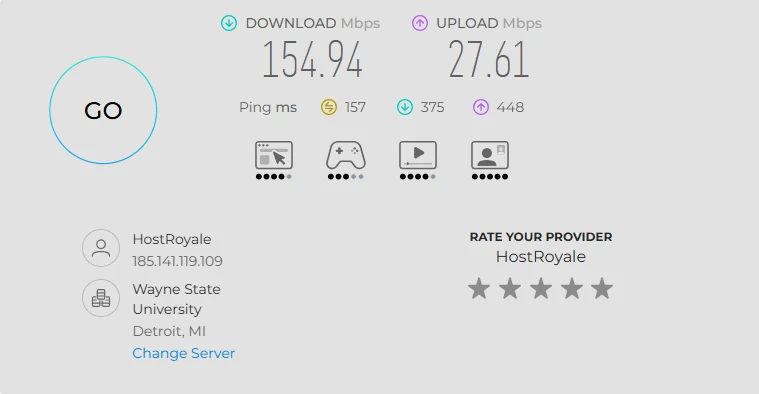
My browser speed test while connected to Surfshark’s Detroit server.
Practical advice: connect to the closest server unless you specifically need another country. Do that and you will not notice Surfshark is on.
How much CPU and RAM does Surfshark use?
At rest, almost nothing: about 1% CPU and ~1 GB of RAM for the whole suite, and turning the VPN on added only ~180 MB with no meaningful CPU cost. The exception is a full antivirus scan: that pushed my whole PC to 60–80% CPU for roughly 18 minutes. It’s built to use spare processing power and finish quickly rather than trickle along in the background, which is a reasonable choice, but on a slower machine you’ll feel it. Day to day it’s invisible; just don’t launch a full scan in the middle of a video call.
Protection & Privacy
Does Surfshark actually hide your IP address?
Yes. In my testing, completely. With the VPN off, checks showed my real IP, my real city, and my ISP. Connected to Surfshark, everything showed a New York server instead, with no trace of my real details. DNS lookups all routed through Surfshark’s own resolver rather than my ISP, so my provider couldn’t see the sites I visit. The WebRTC test, a common sneaky way browsers leak your real address even with a VPN on, came back clean too:
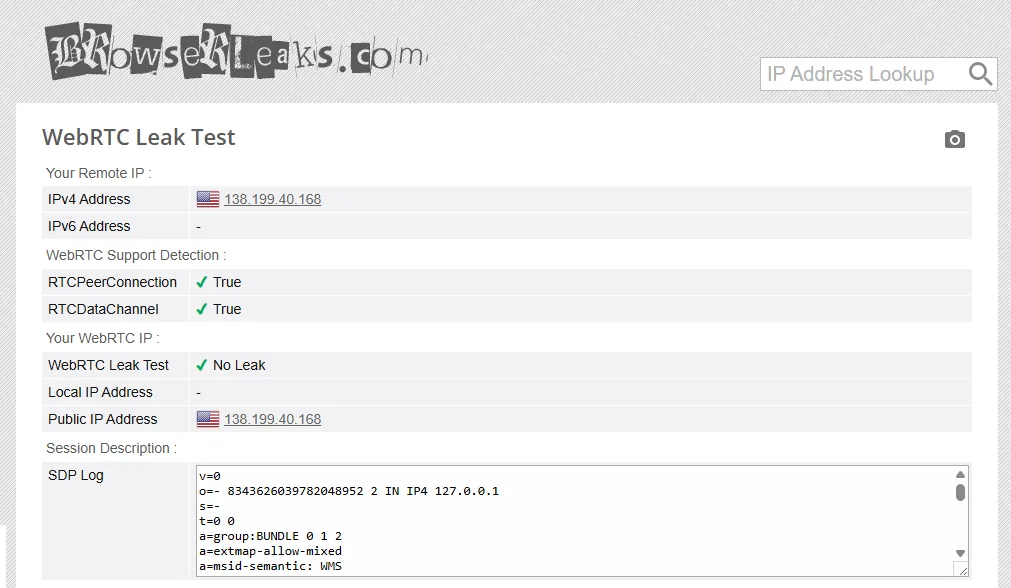
BrowserLeaks WebRTC test: “No Leak”, with only the Surfshark server IP visible and my real address nowhere.
| Check | Result |
|---|---|
| IP leak | Pass: real IP, location and ISP fully replaced |
| DNS leak | Pass: all lookups through Surfshark, not my ISP |
| WebRTC leak | Pass: “No Leak”, server IP only |
| Kill switch | Pass: traffic blocked during drop, auto-reconnected |
Does the Surfshark kill switch work?
Yes. This is the safety net that matters most: if the VPN drops mid-session, it should cut your internet rather than quietly expose your real address. I forced the tunnel to drop while probing my public IP every two seconds. For about four seconds the internet was completely blocked, which is exactly the correct behavior. My real IP never appeared for even a moment, and then Surfshark reconnected on its own without me touching anything.
Does Surfshark’s antivirus actually detect threats?
I checked with the EICAR test file, a harmless, industry-standard file that every antivirus is meant to treat as a threat. Surfshark caught it and quarantined it automatically without a scan, though about ten seconds after the file appeared rather than instantly. I liked the handling: nothing is silently deleted. The file goes to Quarantine where you can review it, delete it, or restore it if it was a false alarm.
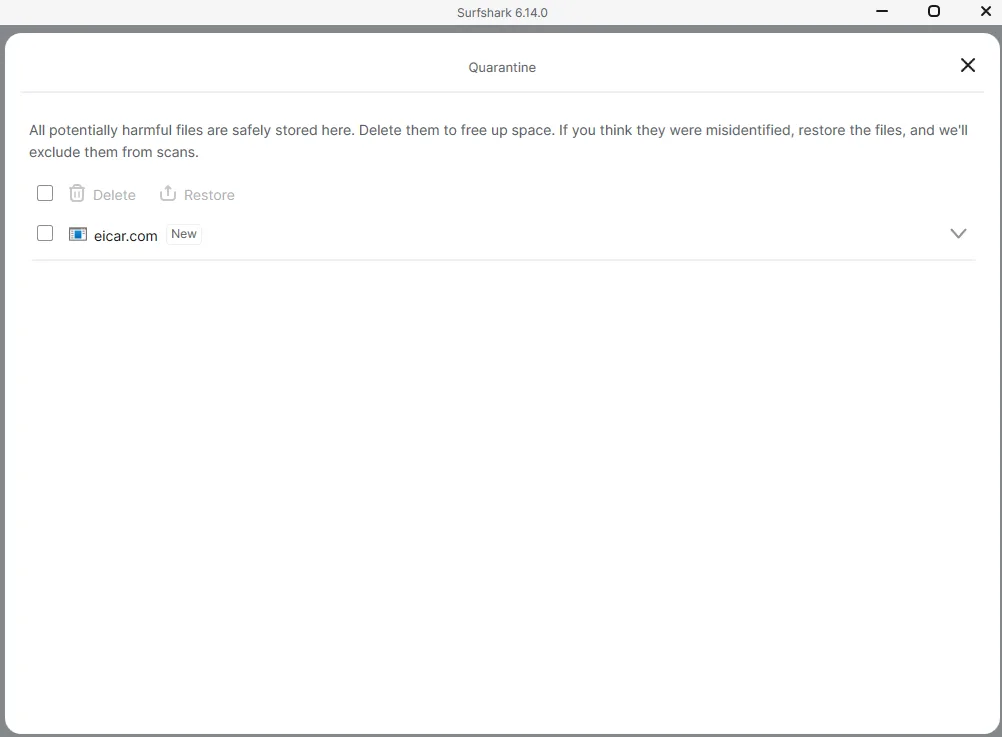
The EICAR test file, caught and quarantined automatically by Surfshark Antivirus.
One genuine flag from my testing: when I deliberately corrupted the antivirus database to simulate a broken install, the in-app “Repair Antivirus” button appeared but didn’t fix it; only a full repair of the app brought protection back. The average user is unlikely to hit this state, but it’s the kind of thing I test for so you don’t find out the hard way.
On the trust fundamentals: Surfshark’s no-logs policy has been independently audited by Deloitte (2023, re-verified June 2025) and Cure53, servers are RAM-only (nothing persists on disk), and the company is based in the Netherlands, which has no mandatory data-retention law. Honest caveats: these are company-commissioned audits (the industry norm), and Surfshark has been part of Nord Security, NordVPN’s parent, since 2022. If you’re comparing those two brands, you’re comparing two products under one owner.
Ease of Use
This is one of the most beginner-friendly security apps I’ve tested. Installation was quick (two small cosmetic pauses between installer screens, nothing more), I signed in with my Google account, and the app immediately walked me through activating the VPN, antivirus, and web content blocker step by step. Total time from download to fully protected: about five minutes.
Two small gripes. Getting help is less visible than it should be: it lives under Settings → Get Help, which a less technical user might not find on their own. Once found, it’s actually excellent: tutorials tuned to your experience level that walk you through setup. The device panel, on the other hand, deserves praise. You can name each device and disconnect any of them remotely, which makes the unlimited-devices promise practical to manage. I added two laptops without any friction.
Features
The standout is unlimited simultaneous devices: every plan, no per-device fee. One subscription covers a family’s phones, laptops, tablets and TVs, which is the clearest edge over NordVPN’s 10-device cap. Beyond that, the pieces I tested firsthand:
-
Surfshark Alert (breach monitoring): the feature that impressed me most. Minutes after setup it surfaced three real breaches tied to my email (Gatehub 2019, Gravatar 2020, and a 2024 mass email list), with severity ratings and specific guidance on what to do about each. I consider myself careful with my data, so this was a wake-up call, and exactly the kind of concrete value most “privacy” features never deliver.
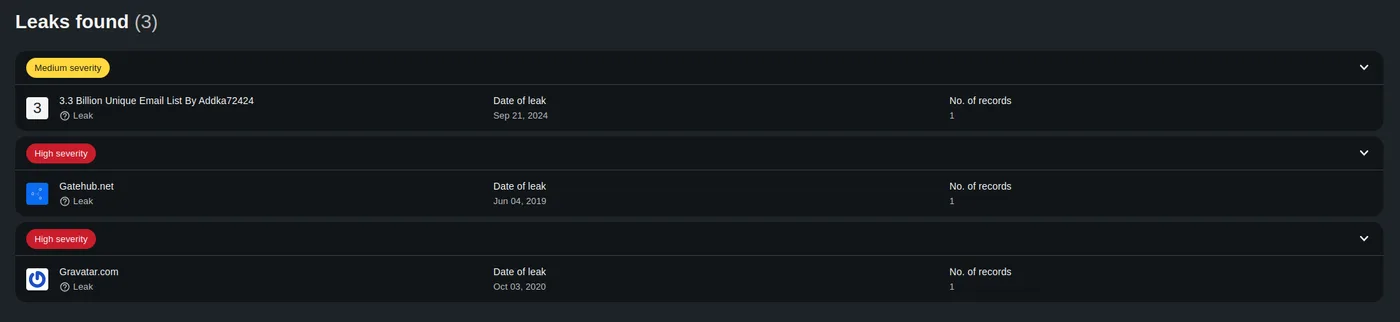
Surfshark Alert’s findings on my own email: three real breaches I didn’t know about.
-
Alternative ID: generates a forwarding email alias, so the address you hand to a shop isn’t your real inbox. If that site is breached later, your real email isn’t what leaks. Simple idea, clever in practice.
-
CleanWeb (ad & tracker blocking): within 15 minutes of browsing it had visibly blocked a pile of ads and trackers. Browsing without the clutter is a quality-of-life upgrade on its own.
-
Breach flags in search results: the browser extension marks Google results with a small indicator if that site recently had a data breach (and when). A quiet, useful “maybe don’t trust this one” nudge.
-
The rest of the toolkit: Bypasser (split tunneling), MultiHop double-VPN, NoBorders and Camouflage modes for restrictive networks, static/dedicated IP options, and Smart DNS for TVs and consoles that can’t run VPN apps.
What I haven’t tested yet (research-based, labeled honestly)
I haven’t yet run my own streaming or heavy-censorship tests, so treat these as well-sourced research rather than firsthand results: independent testing finds Netflix unblocking reliable in the US, UK and most major regions but intermittent in some smaller ones, and BBC iPlayer can drop out. In heavily censored networks like China, real-user reports range widely and success seems to require manual tweaking (NoBorders, Camouflage); don’t rely on it as your only tool there. Torrenting works on 80+ P2P servers, but there’s no port forwarding or SOCKS5, and IPv6 leak protection is manual. I’ll update this section when I test streaming myself.
Pricing: Read This Before You Buy
The intro pricing is genuinely cheap: currently $2.49–$4.49/month on the 24-month plans, with 3 extra months thrown in for a 27-month first term (promos move these around; check surfshark.com/pricing for today’s numbers). A one-month plan runs about $18, and only the 12- and 24-month plans offer the 7-day free trial, a quirk I hit myself at checkout. Their site chatbot, to its credit, answered my trial question instantly before I’d even logged in:
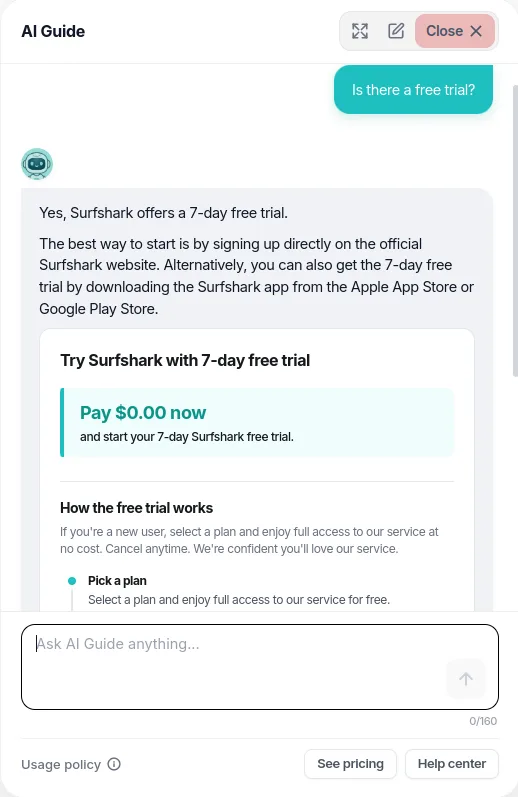
The site chatbot clearing up how the free trial works, faster than digging through help pages.
Now the part to read carefully, because this is where VPN buyers most often get surprised, and not just with Surfshark but industry-wide:
- The low price is an intro rate. After the initial term, plans renew at the standard $79 (Starter) / $99 (One) / $119 (One+) per year, roughly 50–100% above the intro price. Decide whether the product is worth the renewal price, and set a calendar reminder before the renewal date.
- The 30-day money-back guarantee is narrower than the banner suggests. It covers your first purchase only, once per customer, excludes Apple App Store purchases, and does not cover subscriptions that have already renewed.
- Auto-renew is on by default. Cancelling stops the next charge but doesn’t refund the unused portion; your access simply runs to the end of the period.
None of this is hidden or unusual for the industry, but it is the single area where complaints cluster, so go in with eyes open. A small privacy bonus at checkout: you can pay with cryptocurrency, which keeps the purchase itself from being tied to your card.
I also tested cancelling. The process itself is painless: your account page shows the exact date the trial ends, and cancelling took about a minute. It’s a short “why are you leaving?” survey, not an obstacle course. The one thing to watch is the final retention screen. Mine was titled “What if we lower the price?” and offered a “One-time deal” that was actually about 8% more expensive per month than the rate I already had, with my existing, cheaper price struck through as though it were the old one. I suspect a bug in the retention flow rather than intent; I’ve reported it to Surfshark and will update this section with their response. Either way, the lesson applies to any subscription service: read the numbers on a retention offer before you click.
FAQ
Is Surfshark VPN reliable?
Based on my testing, yes, at least on the things that matter most. It passed every leak test I ran (IP, DNS, WebRTC), the kill switch blocked traffic the moment I forced the connection to drop, and it auto-reconnected without exposing my real address. Speeds on a nearby server were within 6% of my normal connection.
Is Surfshark legit and safe to use?
Yes. It’s a real Dutch company (part of Nord Security since 2022) with a no-logs policy independently audited by Deloitte and Cure53 and RAM-only servers. Where users do report problems, it’s overwhelmingly billing (renewal prices and refund terms) rather than the VPN failing at its job. Know the renewal price and it’s a safe buy.
Does Surfshark slow down your internet?
On a nearby server, not noticeably: I measured a 6% download drop and no upload change. Distant servers cost more (about 60% on my New York test), but that’s physics and happens with every VPN. Around 100 Mbps still handled 4K streaming and calls fine.
Does Surfshark work with Netflix?
Not tested firsthand: this answer is based on thorough research of independent testing, and I’ll update it once I run my own streaming tests.
Usually, in major regions. Independent testing finds US and UK Netflix unblock reliably, with some smaller regions intermittent.
Does Surfshark work in China?
Not tested firsthand: this answer is based on research of real-user reports.
Unreliably. Reports range from “works fine” to “barely connects,” and success requires manual tweaks like NoBorders and Camouflage modes. If access from heavily censored networks is your main need, don’t make Surfshark your only tool.
Is Surfshark easy to cancel?
Yes. In my test, cancelling the trial took about a minute. Your account page shows the exact date the trial ends, and the flow is just a short exit survey. One caution: read the final retention offer carefully. The “one-time deal” I was shown actually cost about 8% more than my existing rate.
Is Surfshark worth it for a family?
This is where it shines: unlimited simultaneous devices on every plan means one subscription covers every phone, laptop, tablet and TV in the house, and the device panel lets you name and remotely disconnect devices. Against NordVPN’s 10-device cap, that’s the clearest reason to pick Surfshark.